Adaptive question
Adaptive questions allow you to create follow-up questions that gather additional information based on responses to previous questions. This question type is essential for creating dynamic surveys that adapt to respondent answers, enabling deeper insights and more personalized survey experiences.
Purpose and functionality
Adaptive questions are designed to obtain further information about responses given to other questions in your survey. They create a dynamic relationship between questions, allowing you to dive deeper into specific answers or gather context for particular responses.
Creating an adaptive question
To create an adaptive question, you need to establish a reference to one or more previous questions in your survey that will serve as the basis for the follow-up.

References selection
Selecting the referenced questions
You must select at least one reference question from within the selector interface. This reference determines which question the adaptive question will follow up on.
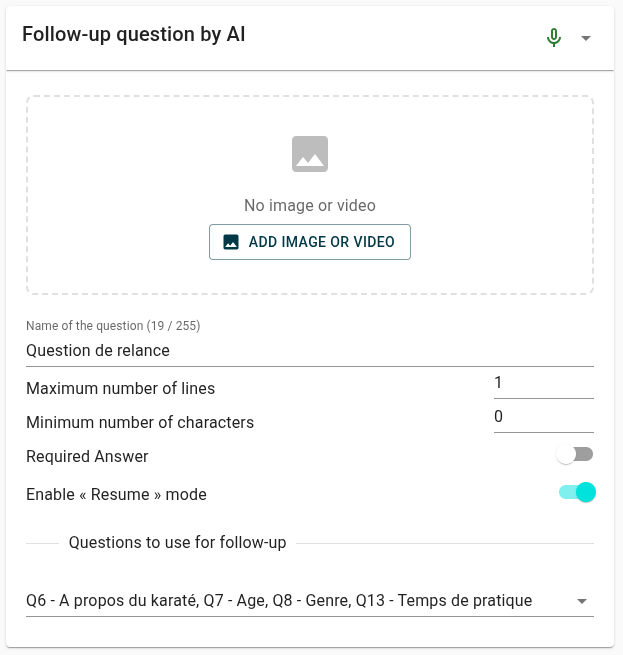
You can only make a follow-up on questions within your current level (current group). This means adaptive questions can only reference questions that exist in the same survey section or group.
Supported question types
You can create follow-up questions from all question types except hotspot questions.
Supported types include:
- Open questions
- Closed questions
- R3m questions
- Battery of items
- Other adaptive questions
Hotspot questions cannot be used as reference questions for adaptive follow-ups due to their specialized interactive nature.
Configuration options
Question setup
Once you've selected your reference question, configure the adaptive question just like any other question type.
- Maximum number of lines
- Minimum number of characters
- Required Answer
- Enable « Resume » mode
Dynamic content
Adaptive questions can reference the specific answers given in the original question, allowing you to create highly personalized follow-up content.
Use the respondent's previous answers to create more relevant and engaging follow-up questions.
"Resume" mode
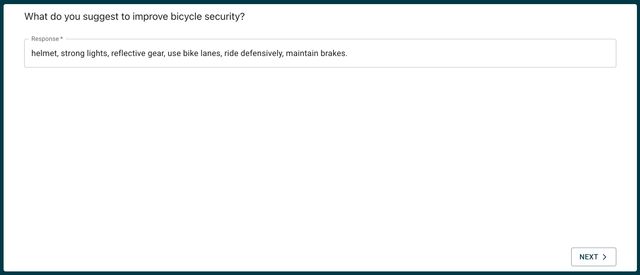
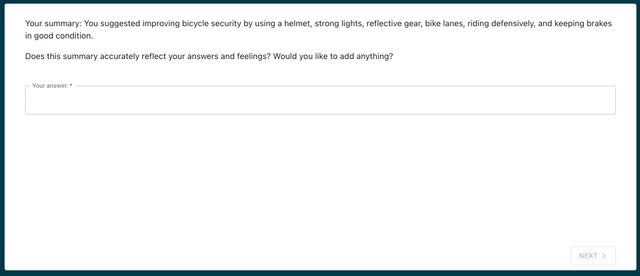
When configuring an adaptive question, you have the option to enable "Resume" mode. This mode allows respondents to revisit and modify their previous answers to the reference question while answering the adaptive follow-up.
Example of "Resume" mode enabled:
- The respondent can see their original answer and has the option to change it before answering the follow-up question.
- This is particularly useful in surveys where respondents may want to reconsider their initial responses based on the follow-up context.
Use cases and examples
Elaboration requests
Ask respondents to elaborate on specific answers they provided.
Example:
- Original question: "What do you think about the functionality?"
- Respondent's answer: "I think we need to improve the UI"
- Adaptive follow-up: "Can you specify which aspects of the UI you believe need the most improvement?"
